Let AI handle your Shopify support.
Stay in control of every action.
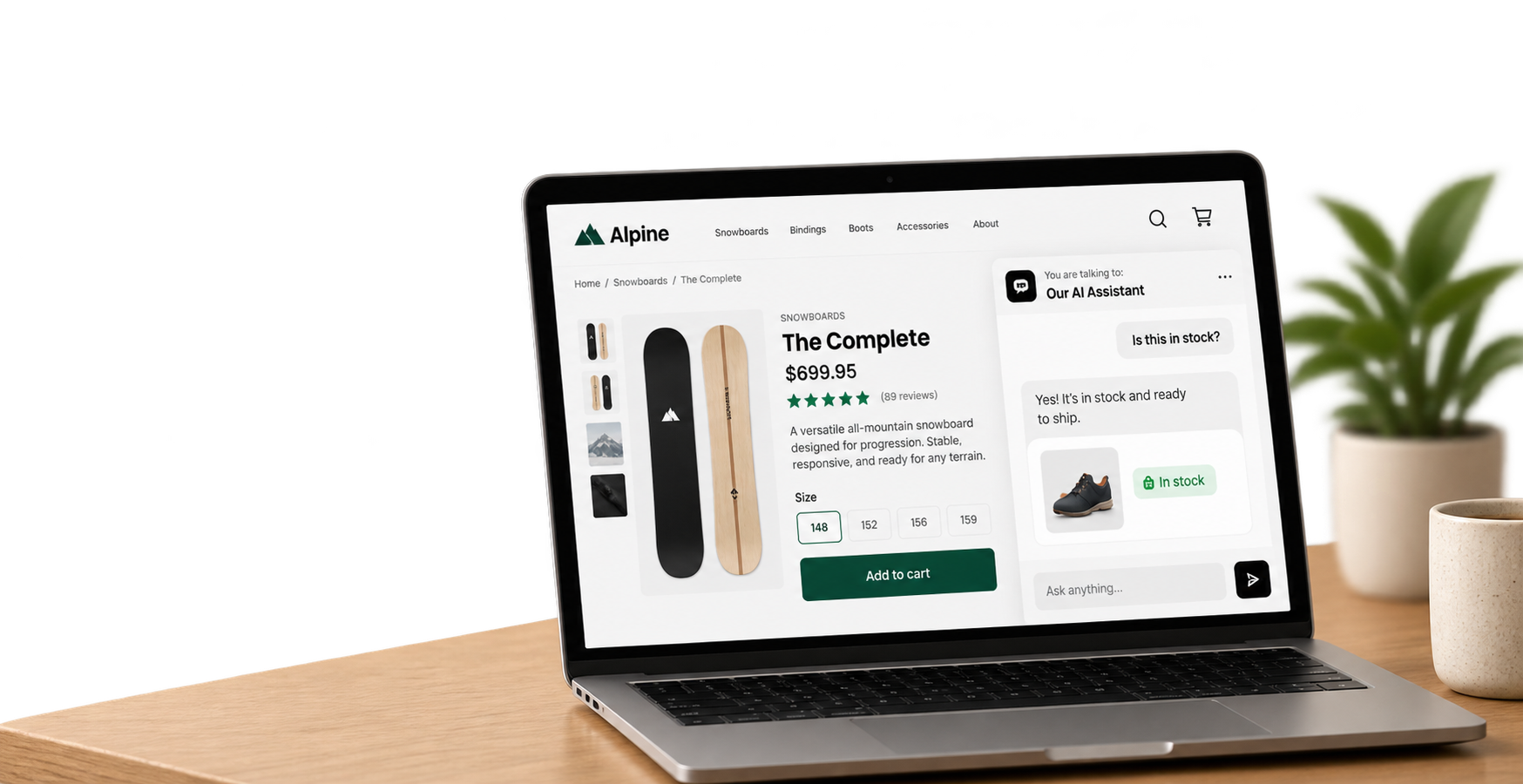
Hastedesk answers product and order questions, tracks deliveries, recommends products, handles support requests, and can take Shopify actions — automatically or with your approval.
Set up in minutes. No workflows to build. No support team required.
Free plan · No credit card · Built exclusively for Shopify
Free
to get started
2 min
setup time
500
AI conversations/month
∞
languages supported
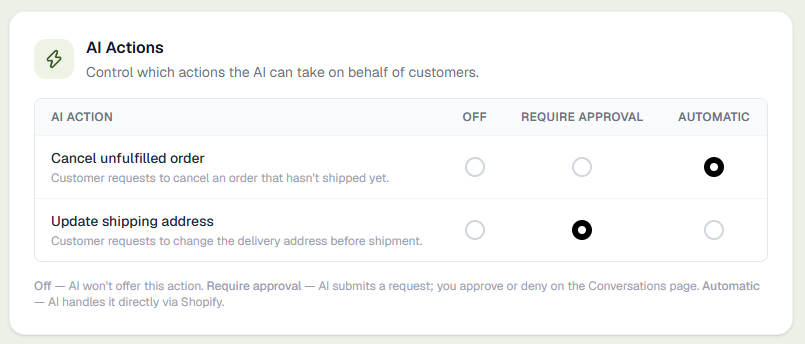
It asks before doing anything sensitive.
Every action Hastedesk can take — cancelling an order, changing an address, approving a refund — has three settings. You decide what runs on its own, action by action.
Off
Hastedesk won't offer this action to customers at all.
Require approval
Hastedesk drafts the request — you approve or deny it from Conversations.
Automatic
Hastedesk handles it directly through Shopify, no back-and-forth needed.
The questions your customers actually ask
Real support isn't a FAQ page. Here's what happens when they ask.
Stock intelligence
Checks real-time inventory and never recommends something that's sold out.
Order tracking
Pulls the real fulfillment status and tracking link straight from Shopify.
Guided returns
Walks them through a button-only flow, with photo evidence when you require it.
Guided exchanges
Checks live stock and only offers sizes that are actually available.
Order cancellations
Cancels unshipped orders — the whole order or just specific items — automatically or with your approval.
Smart recommendations
Asks one clarifying question, then suggests the right product with live price and stock.
Multilingual by default
Replies in whatever language the customer writes in — no configuration needed.
Refund approval controls
Drafts the request and puts it in your queue — nothing moves until you approve it.
Up and running in minutes
No developers needed. No code. No theme editing.
Create your account
Sign up with your email or Google — or just install Hastedesk from Shopify and your account is created for you. You land straight in your dashboard, no credit card required.
Create your account
No credit card required
Shopify Integration
After connecting, Hastedesk detects:
✓ Refund Policy
✓ Shipping Policy
✓ Privacy Policy
✓ Terms of Service
✓ FAQ
Connect your Shopify store
Install Hastedesk from Shopify and approve the permissions — you land straight in your dashboard, connected. Hastedesk auto-detects your policies and pages — import them to the knowledge base in one click.
Test it, then go live
Chat with your AI agent using your real store data before any customer sees it. Test conversations never count toward your monthly limit. When you're happy, hit Go live.
Test before going live
Won't count toward your limit
Everything your store needs
Not a generic chatbot. A support agent that knows your Shopify store inside out.
Stock intelligence
The AI knows your real-time inventory. It never recommends out-of-stock items and always surfaces what's actually available — no stale data, no made-up answers.
Order tracking
Customers ask "where is my order?" and get the real status, fulfillment state, and tracking link from Shopify.
Smart recommendations
When a customer isn't sure what they want, the AI asks one clarifying question at a time and suggests the right product — with a clickable card showing image, price, and stock.
Smart escalation & team inbox
When the AI can't help, it hands off with an AI-written summary. Add reviewers in settings and conversations split into per-person sections — each with a one-click assign button.
Multilingual by default
Customers write in any language and the AI responds in the same language. No configuration needed.
Customer insights
AI analyses your conversations and surfaces recurring topics, complaints, and questions — so you know exactly what your customers keep asking about.
Agent availability
Toggle yourself online or offline in the dashboard. The AI tells customers if a human is available and when your team was last active.
Email tickets
If your team is offline when a customer escalates, they can choose to get an emailed response instead of waiting. Ticket lands in your inbox with the full transcript.
Order cancellations
Customers cancel unshipped orders directly in the chat — the whole order or just specific items, picked from real buttons, never guessed from a description like "the blue one". Choose full automation or approval mode.
Refund approval controls
In approval mode, cancellation requests land in a dedicated tab in your admin with Approve and Deny buttons. Nothing is processed until you say so.
Guided returns
The AI never handles a return itself — it hands off to a button-only flow that verifies the order, lists the real items, and requires a photo automatically for reasons you mark as needing evidence. Always reviewed by you before anything happens.
Guided exchanges
Customer wants a different size or color? The flow checks live Shopify stock and only offers variants actually available — no promising something that's sold out.
Fully customizable widget
Upload your logo and pick your own colors for the chat window and every message bubble — the widget matches your brand, not ours.
Subscription lookups
Connect Recharge and the AI can answer subscription status and next-charge questions from your real data — off by default.
Claude & ChatGPT connector
Connect Hastedesk as a custom AI connector and manage your knowledge base, persona, and conversations straight from chat.
Returns and exchanges, without the guesswork
Hastedesk verifies the customer, identifies the order, collects the reason and photos, and checks all the required information — then gives you a complete, ready-to-decide request. You make the final call, always.
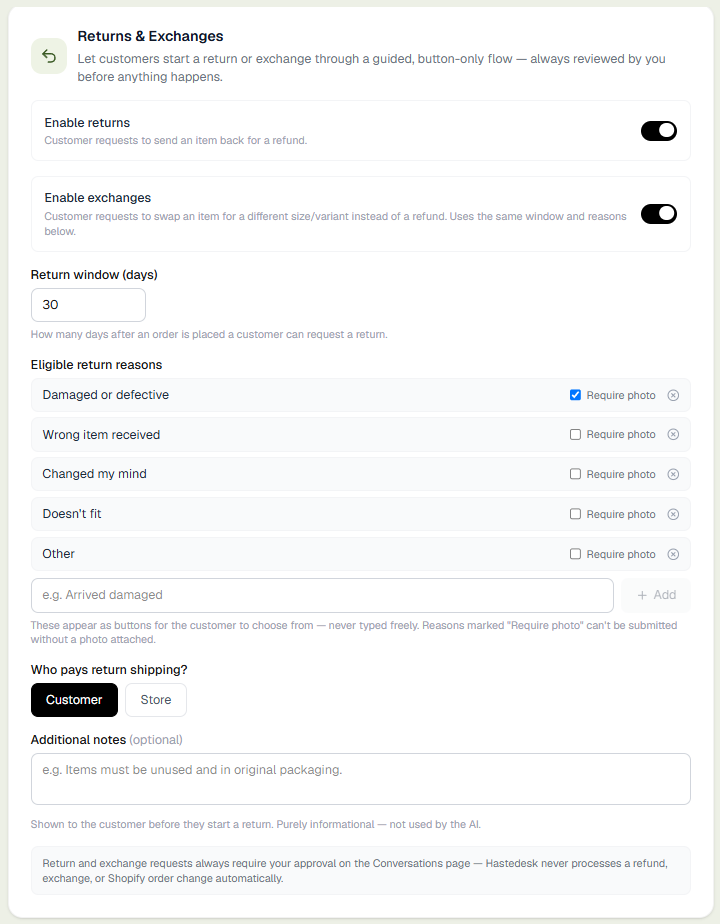
Step 1 — you set the rules once
Pick your reasons, photo rules, and who pays
- Choose which reasons are eligible — customers pick from buttons, never free text
- Require a photo automatically for reasons you flag as needing evidence
- Set a return window, and whether you or the customer pays return shipping
- Checks live Shopify stock so exchanges only offer what’s actually available
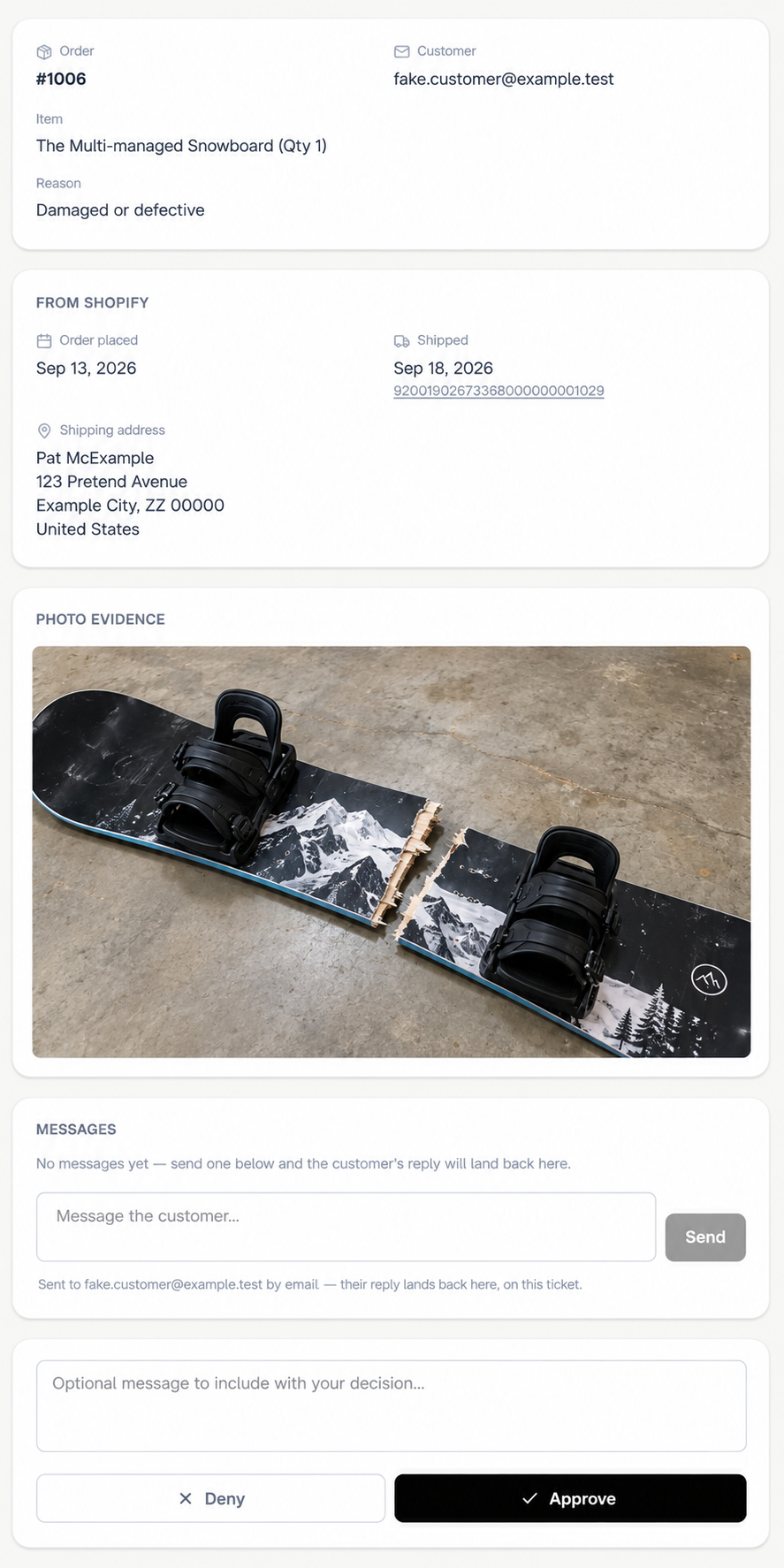
Step 2 — every request lands complete
Review it, message the customer, then decide
- Order details pulled straight from Shopify, plus the customer's photo — nothing to look up yourself
- Message the customer right from the ticket — their reply lands back on the same thread
- You approve or deny — nothing moves until you decide
- Hastedesk never touches a refund, replacement, or Shopify order on its own
- After you approve, you still issue the refund, ship the replacement, and create any return label yourself — Hastedesk saves the intake and back-and-forth, not the fulfilment
Subscription questions, answered honestly
Connect Recharge with an API key and the AI can tell a customer when their next charge is, or what's in their subscription — pulled from your real subscription data, never guessed.
Works with Recharge
Paste an API key from your Recharge account — no developer setup, connected in under a minute.
Real status and next charge date
Looks up the customer's actual subscription items, quantities, and next charge date by their email.
Honest when nothing's found
If no subscription matches the customer's email, the AI says so plainly instead of making something up.
Off by default
Only turn it on if your store actually sells subscriptions — a single toggle in Settings.
Recharge
Connected
Teach it like you'd train a new hire
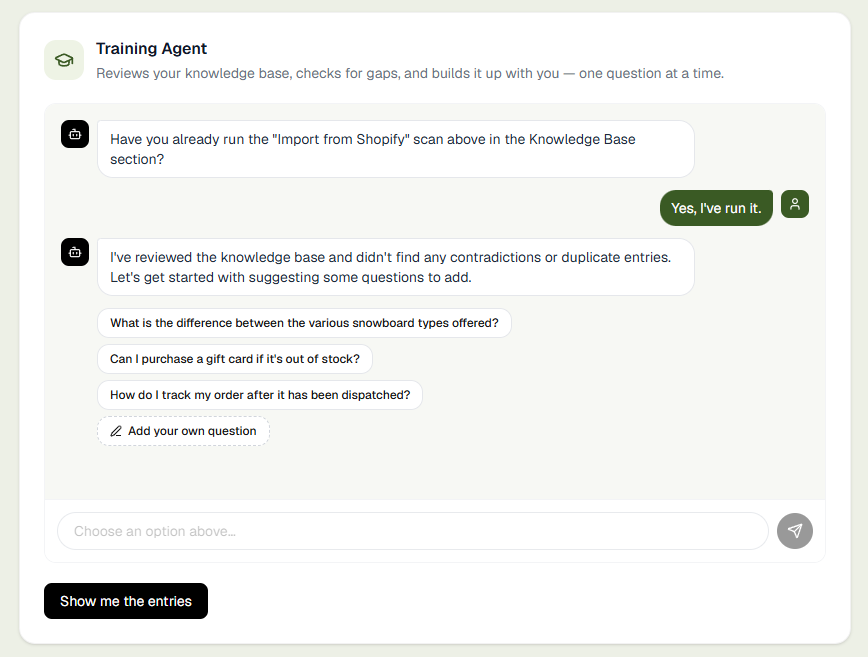
Add your policies and FAQs directly, or paste a URL and let Hastedesk extract them automatically. Then the Training Agent takes over — walking the knowledge base with you, question by question, the same way you'd onboard a new support hire.
Add entries directly, or let AI extract them
Paste your FAQ or policy page URL — Hastedesk extracts and structures everything into knowledge base entries automatically.
The Training Agent checks for gaps first
Reviews your knowledge base for contradictions or duplicate entries, then proposes real candidate customer questions it currently can't answer confidently.
Choose the focus: general info or recommendations
Pick whether it should surface policy/FAQ-style questions or product-recommendation questions — then answer them yourself, one at a time.
Practice mode against your real, live AI
Role-play as a customer and see exactly what your live AI answers. Rate it — any correction gets queued straight into the knowledge base for you to approve.
Test it before it goes live
Chat with your AI agent directly inside the settings page — using your real knowledge base and Shopify data. No widget embed needed, and test conversations never count toward your monthly limit.
Live preview with real data
Asks about your actual products, stock levels, and policies — exactly as your customers would.
Doesn't count toward your limit
Test as many times as you like. Only real customer conversations use your monthly allowance.
"Go live" confirmation
Once you're happy with the responses, hit Go live — the widget activates on your store automatically.
Settings
AI Persona
Shopify store
yourstore.myshopify.com
Test before going live
Won't count toward limit
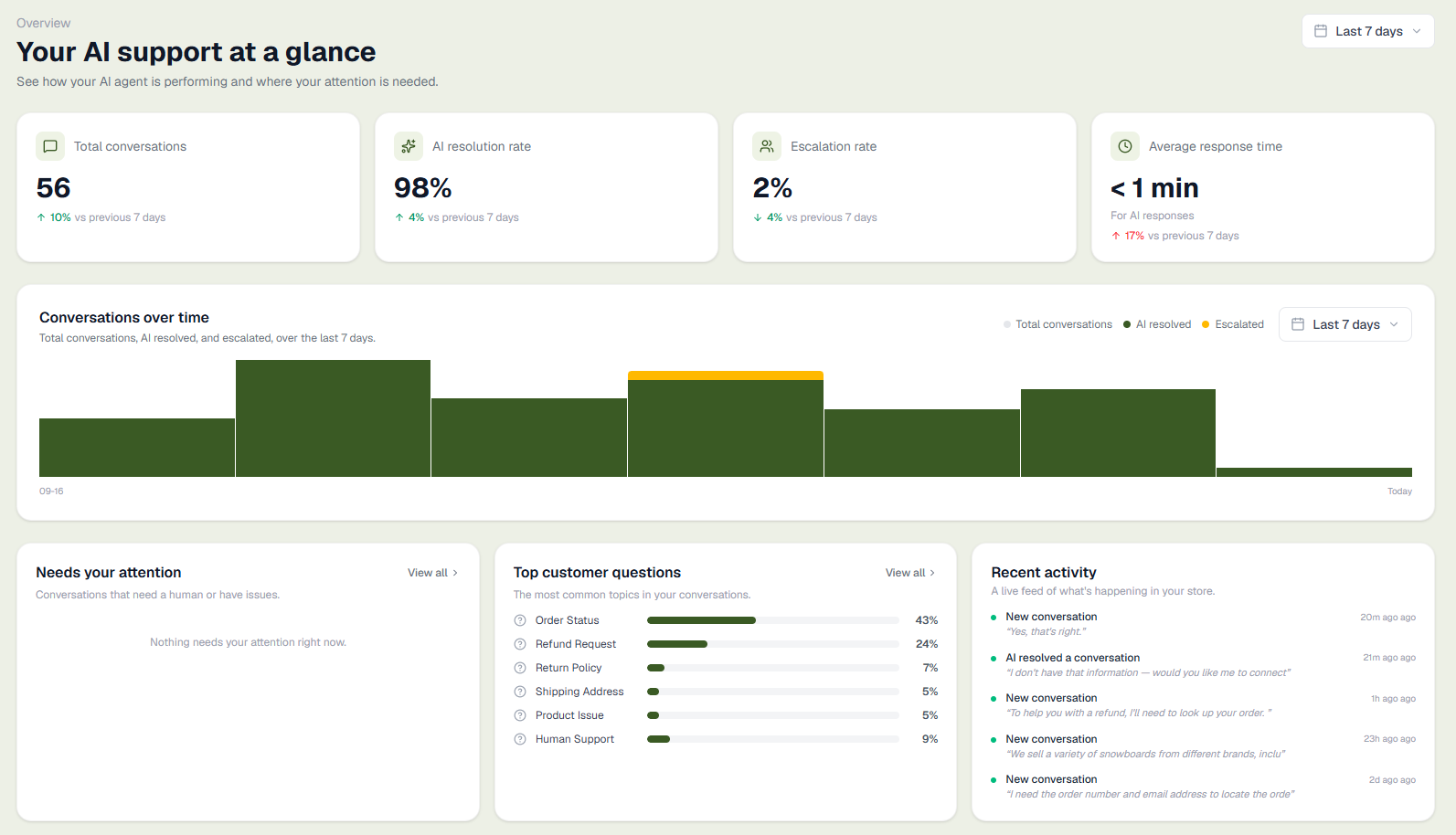
Know exactly how your support is performing
The analytics dashboard gives you a real-time view of how well your AI is handling customer questions — and where it hands off to you.
AI resolution rate
See what percentage of conversations the AI resolves without any human involvement.
Escalation tracking
Track how often customers need to be transferred to a human agent.
30-day trend chart
Visualise conversation volume day by day to spot busy periods.
Monthly conversation count
See how many conversations you've used against your monthly plan.
A support inbox that's just yours — but it's Hastedesk's
Hastedesk gives your store its own support address. Point your existing support email at it, or hand it out directly — customer emails then show up right in Conversations, next to your chats, and Hastedesk writes (or sends) the reply using your real Shopify order and product data. Your own Gmail, Outlook or whatever you use personally is never touched.
Your own inbox stays out of it
Hastedesk never signs in to or reads your personal or business mailbox — there's nothing to connect, no permissions to grant.
You approve every reply by default
In Manual mode, the default, nothing is sent until you approve it in Conversations.
Automatic mode is optional
Simple replies can go out on their own, only to verified senders. Anything about refunds, discounts or money, or where the AI is unsure, stays a draft.
Sensitive emails come to you
Angry customers, legal or payment matters and order changes are passed to you by email, and the AI stops replying to that thread.
How it works
No sign-in, no third-party account, nothing to connect.
1. Point your support address at Hastedesk
A one-line forward, set up in whatever mail provider you already use — or just hand out the Hastedesk address we give your store directly.
2. Hastedesk reads and drafts a reply
New customer email arrives at your Hastedesk address and appears in Conversations, with a reply drafted from your store data.
3. You approve, or it sends itself
Press send in Conversations (Manual), or let simple, verified replies go out on their own (Automatic).
Your email is never sold, never used for advertising, and never used to train AI models. Read our full privacy policy.
Prefer to skip forwarding and connect your Gmail directly? That's available too — currently in a closed beta while Google completes its review, being rolled out to selected stores first.
Manage it from Claude or ChatGPT, too
Add Hastedesk as a custom connector in Claude.ai or ChatGPT with one token, and your assistant can read what's happening in your store — and help you fix it — without you opening the dashboard.
Read your conversations
Ask "what are customers frustrated about this week?" — it pulls your real support conversations and summarises them.
Update your knowledge base from chat
Tell it what changed — "we now ship to Canada in 5 days" — and it adds or edits the knowledge base entry directly.
Rewrite your AI's instructions
Describe a change in tone or behaviour and it updates your AI persona instructions for you.
Surface recurring topics on demand
Pulls the same trending-questions analysis as your Insights tab, right inside your own chat.
Connected via custom connector
See it working on a real store
Chat with a live Hastedesk AI agent, look up real orders, and see exactly what the store owner dashboard looks like.
Simple pricing
Start free. Upgrade when you need more.
Free
Everything you need to get started, forever free.
50 AI conversations/month
Resets each month
Chat widget
Embed on any Shopify store
Shopify integration
Products, orders & stock
Knowledge base
Train the AI on your store
Pro
3,000 AI conversations/month. Pay $0.03 per extra — or cap it.
3,000 AI conversations/month
Optional overages at $0.03 each
Everything in Starter
All features included
Team seats
Unlimited teammates, each with their own login
Lower overage rate
Half the per-conversation cost
Starter
14-day free trial500 AI conversations/month. Pay $0.05 per extra — or cap it.
500 AI conversations/month
Optional overages at $0.05 each
Everything in Free
Plus all features below
Smart escalation & team inbox
Assign convos to reviewers
Order cancellations
Whole order or specific items — auto or require approval
Guided returns & exchanges
Button-driven, photo evidence, always reviewed by you
Analytics & insights
Resolution rate, trends & topics
Simple flat monthly plans. Cancel anytime.
Stop answering the same questions twice.
Let AI handle the repetitive stuff so you can focus on growing your store.
Start for free